
I’ve been using Vim for years but Vim’s built-in insert mode content completion is something I only recently took the time to learn. In this blog post I’m going to share how I’ve configured insert mode completion using only features built into Vim 9.
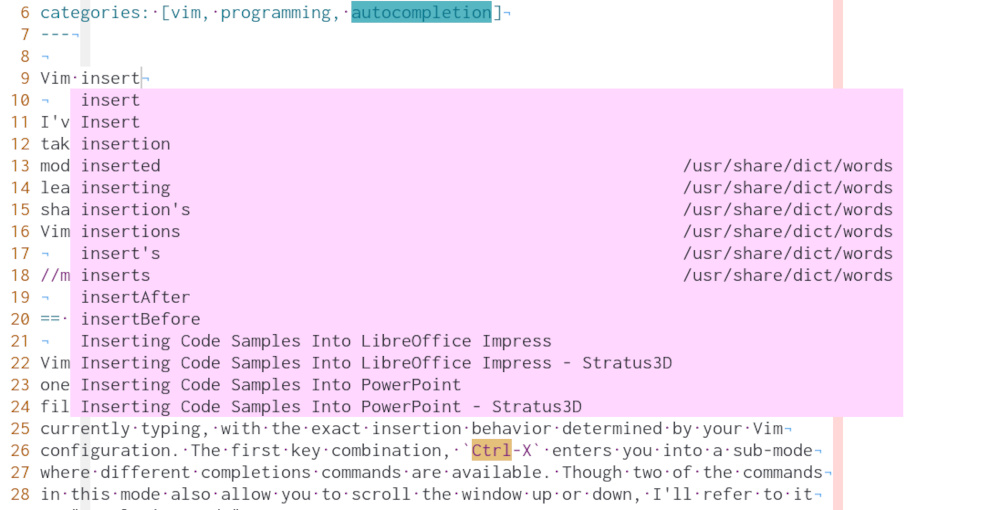
Available Completions
Vim provides many different types of insert mode completions out of the box. Each
one is bound to a unique key binding. To complete to a keyword present in the
current file you’d type Ctrl-X,Ctrl-N. This will trigger completion of the
word you are currently typing, with the exact insertion behavior determined by
your Vim configuration. The first key combination, Ctrl-X, enters you into a
sub-mode where different completion commands are available. Although two of the
commands in this mode also allow you to scroll the window up or down, I’ll
refer to it as "completion mode."
Within this completion mode, there are different types of completions that can
be used. Vim’s help on this (:help ins-completion) has the whole list:
Completion can be done for:

1. Whole lines						|i_CTRL-X_CTRL-L|
2. keywords in the current file				|i_CTRL-X_CTRL-N|
3. keywords in 'dictionary'				|i_CTRL-X_CTRL-K|
4. keywords in 'thesaurus', thesaurus-style		|i_CTRL-X_CTRL-T|
5. keywords in the current and included files		|i_CTRL-X_CTRL-I|
6. tags							|i_CTRL-X_CTRL-]|
7. file names						|i_CTRL-X_CTRL-F|
8. definitions or macros				|i_CTRL-X_CTRL-D|
9. Vim command-line					|i_CTRL-X_CTRL-V|
10. User defined completion				|i_CTRL-X_CTRL-U|
11. omni completion					|i_CTRL-X_CTRL-O|
12. Spelling suggestions				|i_CTRL-X_s|
13. completions from 'complete'				|i_CTRL-N| |i_CTRL-P|
14. contents from registers				|i_CTRL-X_CTRL-R|
There are a LOT of options here! While it’s great that there are many types of completion available, this created a problem for me. How am I going to remember all these key bindings? And how am I going to choose the best one when I want completion? I’d rather not have to think about what to do when completing a word.
Completions from 'complete'
Number 13 on that list was interesting to me.
13. completions from 'complete' |i_CTRL-N| |i_CTRL-P|I wasn’t sure what was meant by 'complete' so I looked it up and found out
it’s keyword completion with suggestions from various sources. The documentation
for this option lists various keyword sources that can be used. Here is the
full list straight from the Vim documentation:
'complete' 'cpt'	string	(default: ".,w,b,u,t,i")
			local to buffer
	This option specifies how keyword completion |ins-completion| works
	when CTRL-P or CTRL-N are used.  It is also used for whole-line
	completion |i_CTRL-X_CTRL-L|.  It indicates the type of completion
	and the places to scan.  It is a comma-separated list of flags:
	.	scan the current buffer ('wrapscan' is ignored)
	w	scan buffers from other windows
	b	scan other loaded buffers that are in the buffer list
	u	scan the unloaded buffers that are in the buffer list
	U	scan the buffers that are not in the buffer list
	k	scan the files given with the 'dictionary' option
	kspell  use the currently active spell checking |spell|
	k{dict}	scan the file {dict}.  Several "k" flags can be given,
		patterns are valid too.  For example: >
			:set cpt=k/usr/dict/*,k~/spanish
<	s	scan the files given with the 'thesaurus' option
	s{tsr}	scan the file {tsr}.  Several "s" flags can be given, patterns
		are valid too.
	i	scan current and included files
	d	scan current and included files for defined name or macro
		|i_CTRL-X_CTRL-D|
	]	tag completion
	t	same as "]"
	F{func}	call the function {func}.  Multiple "F" flags may be specified.
		Refer to |complete-functions| for details on how the function
		is invoked and what it should return.  The value can be the
		name of a function or a |Funcref|.  For |Funcref| values,
		spaces must be escaped with a backslash ('\'), and commas with
		double backslashes ('\\') (see |option-backslash|).
		Unlike other sources, functions can provide completions starting
		from a non-keyword character before the cursor, and their
		start position for replacing text may differ from other sources.
		If the Dict returned by the {func} includes {"refresh": "always"},
		the function will be invoked again whenever the leading text
		changes.
		If generating matches is potentially slow, call
		|complete_check()| periodically to keep Vim responsive. This
		is especially important for |ins-autocompletion|.
	F	equivalent to using "F{func}", where the function is taken from
		the 'completefunc' option.
	o	equivalent to using "F{func}", where the function is taken from
		the 'omnifunc' option.
This list includes every type of completion I might want to use.
When you trigger completion in insert mode with Ctrl-N or Ctrl-P any of
the keywords matching the prefix you’ve typed are suggested. It has a default
of .,w,b,u,t,i, which is all matching keywords from the current buffer, all
buffers in the buffer list, tags, and included files.
This was what I had been looking for. There are different keyword sources
available, and with the F{func} option I can create my own custom completions
if I need to.
This 'complete' option is also buffer-specific, so different settings can be
used for each buffer. Since I use Vim’s filetype plugin it’s easy to change
this based on the file type of the open buffer.
Configuration
I wanted keyword completions to be pulled from the current buffer and any open
buffers in any window. I also wanted keywords from an English dictionary in most
buffers, as well as tags, LSP keywords from
ALE, and
UltiSnips snippet names available for
the current file type. The two things I found challenging to configure were the
dictionary and UltiSnips snippet names, so I’ll come back to those. For
everything else I added this to my .vimrc:
" Use ale suggestions for omni complete
set omnifunc=ale#completion#OmniFunc

" Use words from current file, buffers in any open window, and any open buffer
set complete=.,w,b

" Use tags for completion as well
set complete+=t

" Use omnifunc completion for LSP suggestions
set complete+=o
Vim Dictionaries
Initially I thought all I needed to do to enable dictionary completion was to
add this to my .vimrc:
set complete+=kIt turns out there is
more that needs to be done.
Vim must be configured with the location of the dictionary file to use. You can
check your Vim configuration by running set dictionary?. I did not have this
option set, so no dictionary was available. On MacOS there was already a
dictionary file installed. On Arch Linux I needed to install a dictionary file,
and did so with:
sudo pacman -S wordsThis installed a file at /usr/share/dict/words containing the English
dictionary. I then configured Vim to use it by setting the dictionary option to
the file path:
set dictionary+=/usr/share/dict/wordsAfter restarting Vim dictionary completion worked.
UltiSnips Snippet Name Completion
I looked around and didn’t find insert completion built into UltiSnips, but I
did find the SnippetsInCurrentScope function. When invoked with
1 it returns all snippets available for the current buffer. This allowed me
to get a list of all available snippet names, filter the list by those matching
the existing prefix, and return them as suggestions. In order to do this I had
to write a custom completion function.
According to the Vim documentation a custom completion function must do two things:
The function is called in two different ways: - First the function is called to find the start of the text to be completed. - Later the function is called to actually find the matches.
On the first invocation the arguments are:
a:findstart 1
a:base empty
The function must return the column where the completion starts.
…
On the second invocation the arguments are:
a:findstart 0
a:base the text with which matches should match; the text that was located in the first call (can be empty)
The function must return a List with the matching words.
So while it is one function it’s actually doing two different things.
Implementing this function is straightforward; if a:findstart
is set it calculates the column index of the word that needs to be completed.
It does this by taking the current column and stepping backwards through
characters on the line until it finds the first alphabetic character of the
current word.
The other half of the function is responsible for generating suggestions. It
fetches the available snippets with UltiSnips#SnippetsInCurrentScope(1) and
then it loops over the snippets. If the snippet matches the prefix of a:base
then it appends a dictionary of snippet suggestion details to a list of
suggestions. It then returns the full list of suggestions. Here is the complete
function:
" Custom completion function for available UltiSnips snippets
function! UltiSnipsSnippetName(findstart, base) abort
  if a:findstart
    " Locate the start of the word to be completed, and return the index of it
    let line = getline('.')
    let col = col('.') - 1
    while col > 0 && line[col - 1] =~ '\a'
      let col -= 1
    endwhile

    return col
  else
    " Find any snippets with a matching name and return them as suggestions
    let suggestions = []

    let snippets = UltiSnips#SnippetsInCurrentScope(1)

    for snippet_name in keys(snippets)
      let description = get(snippets, snippet_name)
      let suggestion = {'word': snippet_name, 'menu': description, 'kind': 'S'}

      if snippet_name =~ '^' . a:base
        call add(suggestions, suggestion)
      endif
    endfor

    return suggestions
  endif
endfunction
I then set this function as completefunc:
" Use custom UltiSnipsSnippetName completion function as completefunc
set completefunc=UltiSnipsSnippetName
Key Bindings
I also configured key bindings for insertion completion. With what I’ve
configured so far in this post, completion is triggered with Ctrl-X,Ctrl-N, I
prefer completion suggestions to appear automatically as I type. This can be
enabled with the autocomplete option:
'autocomplete' 'ac' boolean (default off) global {only available on platforms with timing support}
When on, Vim shows a completion menu as you type, similar to using |i_CTRL-N|, but triggered automatically. See |ins-autocompletion|.
" Turn on insert mode text as-you-type completion
set autocomplete
I also wanted a key binding for easy navigation of the suggestions list when it appears. I like to use the tab key to navigate the list. I configured this with the following mappings:
" Map tab and shift-tab to insert completion navigation bindings when
" completion menu is visible.
inoremap <silent><expr> <Tab>   pumvisible() ? "\<C-n>" : "\<Tab>"
inoremap <silent><expr> <S-Tab> pumvisible() ? "\<C-p>" : "\<S-Tab>"
Summary
Putting all this together, I’ve got autocompletion that appears whenever I begin to type a word and matching suggestions are found. I can easily navigate the suggestions list with tab and shift-tab. Suggestions include all keywords from buffers, project tags, dictionary words, LSP completions from ALE, and available snippets from UltiSnips. I can also customize the type of completions I want to appear for every file type. This approach does not use any plugins. It is a fast and flexible autocompletion system that I can easily customize as my needs change. It also does not interfere with GitHub Copilot so I can still have AI suggestions as well. Here is the complete configuration I have in my vimrc file:
" Custom completion function for available UltiSnips snippets
function! UltiSnipsSnippetName(findstart, base) abort
  if a:findstart
    " Locate the start of the word to be completed, and return the index of it
    let line = getline('.')
    let col = col('.') - 1
    while col > 0 && line[col - 1] =~ '\a'
      let col -= 1
    endwhile

    return col
  else
    " Find any snippets with matching name and return them as suggestions
    let suggestions = []

    let snippets = UltiSnips#SnippetsInCurrentScope(1)

    for snippet_name in keys(snippets)
      let description = get(snippets, snippet_name)
      let suggestion = {'word': snippet_name, 'menu': description, 'kind': 'S'}

      if snippet_name =~ '^' . a:base
        call add(suggestions, suggestion)
      endif
    endfor

    return suggestions
  endif
endfunction

" Use custom UltiSnipsSnippetName completion function as completefunc
set completefunc=UltiSnipsSnippetName

" Use ale suggestions for omni complete
set omnifunc=ale#completion#OmniFunc

" Use words from current file, buffers in any open window, and any open buffer
set complete=.,w,b

" Use omnifunc completion for LSP suggestions
set complete+=o

" Use completefunc completion for UltiSnips snippet name suggestions
set complete+=F

" Use tags for completion as well
set complete+=t

" Use words from dictionary for completion
" https://www.reddit.com/r/vim/comments/39l4jt/comment/cs4y7la/
set complete+=k

" Turn on insert mode text as-you-type completion
set autocomplete

" Map tab and shift-tab to insert completion navigation bindings when
" completion menu is visible.
inoremap <silent><expr> <Tab>   pumvisible() ? "\<C-n>" : "\<Tab>"
inoremap <silent><expr> <S-Tab> pumvisible() ? "\<C-p>" : "\<S-Tab>"
References
-
help 'complete' -
help 'ins-autocompletion' -
help 'ins-autocompletion-example' -
https://www.reddit.com/r/vim/comments/39l4jt/comment/cs4y7la/